
Contributing to the Project#
As an open-source project, we welcome and encourage the community to submit patches for code, documentation, tests, and audio algorithms directly to the Sound Open Firmware (SOF) project. In our collaborative open-source environment, standards and methods for submitting changes help ensure high code quality, architectural consistency, and smooth community collaboration.
This document serves as the comprehensive single-page reference for all aspects of contributing to SOF:
Contribution Guidelines: Licensing (BSD-3-Clause), Developer Certificate of Origin (DCO), and prerequisites.
Linux SOF Driver Development: Linux SOF kernel drivers, git trees, upstream workflow, and maintainers.
Firmware ABI Change Process: Firmware-to-driver ABI change process, RFC reviews, and compatibility.
Bug Tracking & Reporting: Bug life cycle, issue triage labels, reporting guidelines, and audio quality proof captures.
Documentation Guidelines: Documentation formatting in reStructuredText and Sphinx.
Documenting Source Code (Doxygen): Documenting source code headers with Doxygen annotations.
Building & Publishing Documentation: Building, previewing, and publishing SOF documentation locally and with Docker.
Contribution Guidelines#
As an open-source project, we welcome and encourage the community to submit patches directly to the SOF project. In our collaborative open source environment, standards and methods for submitting changes help reduce the chaos that can result from an active development community.
This section explains how to participate in project conversations, log and track bugs and enhancement requests, and submit patches to the project so your patch will be accepted quickly in the codebase.
Licensing#
Licensing is very important to open source projects. It helps ensure the software continues to be available under the terms that the author desired.
The SOF project uses a BSD-3-Clause license, as found in the thesofproject/sof file in the project’s GitHub repo.
A license tells you what rights you have as a developer, as provided by the copyright holder. It is important that the contributor fully understands the licensing rights and agrees to them. Sometimes the copyright holder isn’t the contributor, such as when the contributor is doing work on behalf of a company.
Developer Certification of Origin (DCO)#
To make a good faith effort to ensure licensing criteria are met, project SOF requires the Developer Certificate of Origin (DCO) process to be followed.
The DCO is an attestation attached to every contribution made by every
developer. In the commit message of the contribution, the developer
adds a Signed-off-by statement and thereby agrees to the DCO.
When a developer submits a patch, it is a commitment that the contributor has the right to submit the patch per the license. The DCO agreement is shown below and at http://developercertificate.org/.
Developer's Certificate of Origin 1.1

By making a contribution to this project, I certify that:

(a) The contribution was created in whole or in part by me and I
    have the right to submit it under the open source license
    indicated in the file; or

(b) The contribution is based upon previous work that, to the
    best of my knowledge, is covered under an appropriate open
    source license and I have the right under that license to
    submit that work with modifications, whether created in whole
    or in part by me, under the same open source license (unless
    I am permitted to submit under a different license), as
    Indicated in the file; or

(c) The contribution was provided directly to me by some other
    person who certified (a), (b) or (c) and I have not modified
    it.

(d) I understand and agree that this project and the contribution
    are public and that a record of the contribution (including
    all personal information I submit with it, including my
    sign-off) is maintained indefinitely and may be redistributed
    consistent with this project or the open source license(s)
    involved.
DCO Sign-Off Methods#
The DCO requires that a sign-off message, in the following format, appears on each commit in the pull request:
Signed-off-by: Random J Developer <developer@example.com>
The DCO text can either be manually added to your commit body, or you can add
either -s or --signoff to your usual Git commit commands. If you forget
to add the sign-off, you can also amend a previous commit with the sign-off by
running git commit --amend -s. If you have already pushed your changes to GitHub,
you will need to force push your branch after this with git push -f.
Note
The name and email address of the account you use to submit your PR must
match the name and email address on the Signed-off-by line in
your commit message.
Prerequisites#
As a contributor, familiarize yourself with the SOF project, how to configure, install, and use it as explained on the SOF project website, and how to set up your development environment as introduced in the project’s Getting Started Guides.
You should be familiar with common developer tools such as Git and platforms such as GitHub.
If you have not already done so, create a (free) GitHub account on github and have Git tools available on your development system.
Linux SOF Driver Development#
Background#
Linux development is split by subsystems. All SOF contributions are merged through the sound/system (maintained by Takashi Iwai) and the sound/soc subsystem (maintained by Mark Brown).
All SOF patches merged by the two maintainers will be used for linux-next (as a first pass of integration to detect conflicts with other subsystems or compilation issues) and eventually merged in the mainline by Linus Torvalds.
Instructions for SOF Developers#
ABI Changes#
One fundamental and non-negotiable premise of Linux kernel development is “we don’t break the userspace.” More specifically, users may update their kernels at any time while keeping the SOF firmware binary and topology files stored in the root filesystem unchanged. The expectation is that the SOF Linux driver does not generate any errors and that audio functionality remains unchanged.
Conversely, when a capability is introduced in a new firmware release, the expectation is that the kernel shall be updated as well. In other words, a new firmware does not need to include any backwards-compatibility code to interface with an older kernel.
When the ABI changes, the developer or maintainer shall tag it in GitHub, and the ABI level change will be recorded in the official ABI change tracker:
The process for firmware ABI changes is documented in Firmware ABI Change Process.
When the ABI is not backwards-compatible, Pull Requests on the kernel side shall include code that deals with older firmware and topology files.
Development Branch#
All SOF development takes place on the topic/sof-dev branch in the SOF tree:
git@github.com:thesofproject/linux.git
Developers are required to submit Pull Requests (PRs) against the
topic/sof-dev branch. The Continuous Integration (CI) runs a set
of static analysis, builds, and on-device testing.
Two approvers are required for each PR. SOF admins may in some exceptions use their privileges to merge PRs, such as to restore functionality and broken builds.
When a PR is submitted by an SOF admin, another admin must approve that PR. The PRs are integrated into the SOF tree using the ‘rebase-and-merge’ method which keeps the integrated patches in a linear order.
Rebasing Tree#
In addition to the topic/sof-dev branch, the SOF project maintains a
parallel topic/sof-dev-rebase branch. This branch is not intended for
development, but to make upstream contributions easier to manage.
As its name indicates, commit SHA1s in topic/sof-dev-rebase are volatile
and should not be relied on. SHA1s in topic/sof-dev are immutable.
Upstream Merges#
During Linux development, patches to the ALSA/ASoC cores, dependencies such as audio codecs, or bug fixes may be contributed by the community. SOF Linux maintainers will, on a regular basis (typically weekly), merge all upstream contributions into the SOF tree.
Development Flow#
SOF Linux Maintainers#
Organization |
Maintainer |
GitHub Handle |
|---|---|---|
Consultant |
Pierre Bossart |
|
Intel |
Kai Vehmanen |
|
Intel |
Peter Ujfalusi |
|
Intel |
Bard Liao |
|
NXP |
Daniel Baluta |
SOF Maintainers Process#
- Mirror all SOF patches to topic/sof-dev-rebase:
This mirroring consists in doing a set of git “cherry-pick” operations from
topic/sof-devtotopic/sof-dev-rebase. Once all development patches are applied, SOF maintainers will add the relevant Signed-off-by and Reviewed-by tags.In specific cases, incremental patches will be squashed to simplify upstream reviews, commit messages will be made clearer, and the order of patches will be changed, but in all cases the intent is that both
topic/sof-devandtopic/sof-dev-rebaseprovide the same code (as seen with git diff or diff -r).- Upstream merge/rebase:
When the two branches are integrated, the SOF maintainer will create an upstream baseline. This baseline is then merged locally on top of
topic/sof-dev, then pushed as a dedicated PR and run through the CI tests. The merge may in some cases create conflicts that have to be resolved locally by the maintainer. Once the PR is deemed suitable for integration, the maintainer will use a ‘Commit merge’ operation (in contrast to the ‘rebase-and-merge’ used for development).In parallel, the
topic/sof-dev-rebasebranch is rebased on top of the same baseline, and again compared to thetopic/sof-devbranch. After the two separate operations of merge and rebase on the two branches, these two branches should again be identical. The net effect of the rebase is that all patches already integrated by ALSA/ASoC maintainers ‘disappear.’ In other words, comparing sof-dev with sof-dev-rebase shows all patches not currently merged upstream. This includes a limited number of infrastructure changes that will never be merged upstream such as github’s CODEOWNERS file.- Upstream contributions:
The SOF maintainer generates patch sets and sends them with a cover to the alsa-devel mailing list, with the maintainers in Cc:. In most cases the patches are approved without issues, but the ALSA/ASoC maintainers or members of the community may provide feedback and request some changes. In those cases, the changes are applied on
topic/sof-dev, then mirrored and squashed ontopic/sof-dev-rebase, and submitted again. Under no circumstances should the SOF maintainer handle changes to thetopic/sof-dev-rebasedirectly.- Exceptions:
In very specific cases, such as for HDMI-related patches, it might be easier for an SOF developer to submit the patches directly to alsa-devel. By default, though, the process is that all patches are first submitted to the SOF GitHub, CI-tested. Only when maintainers provide a written agreement should developers submit SOF-related patches directly to the alsa-devel mailing list.
To avoid disrupting the development and rewriting its history, all upstream patches are integrated using the “Merge commit” option.
Development Summary#
     +----reject-----------+                      +--------merge----------------+
     |                     |                      |                             |
     v                     |                      v                             |
+----+------+        +-----+-------+       +------+--------+           +--------+----------+
| developer +------->+ SOF reviews +--ok-->+ topic/sof-dev |         +-+ upstream baseline |
| PR        |        | CI tests    |       |               |         | |                   |
+-----------+        +-----+-------+       +------+--------+         | +---------+---------+
                           |                      |                  |           ^
                           |                               +--rebase-+           |
                           |                      |        |             ALSA maintainers ok
                           |                      |        v                     |
                           |           +----------v--------+--+         +--------+----------+
                           |           | topic/sof-dev-rebase +-email-->+    alsa-devel     |
                           |           |                      |         |    mailing list   |
                           |           +----------------------+         +--------+----------+
                           |                                                     ^
                           |                                                     |
                           |                                                     |
                           +-----------------direct path (exceptions)------------+
Firmware ABI Change Process#
SOF ABI Definitions#
The SOF ABI consists of public structs used in host-FW communication defined in:
src/include/kernel/src/include/ipc/src/include/user/
SOF ABI versioning is defined in firmware source code documentation: thesofproject/sof.
Change Process#
When a firmware change requires extending or modifying the public SOF ABI, the developer must go through the ABI change process as defined in this section. The developer must drive this process, contact the stakeholders, request reviews (and re-reviews when needed) and coordinate with the driver maintainers.
The main steps of the process are depicted in the following state diagram:
The pull requests are classified in GitHub using the official ABI Change Tracker.
Figure 339 ABI process state diagram#
When the ABI change is not backwards-compatible, Pull Requests on the kernel side shall include code that deals with older firmware and topology files. See Linux SOF Driver Development for kernel side documentation.
Document Modified Fields#
When the interface is extended with a backwards-compatible (MINOR) interface change, each added or modified interface field must be documented with a reference to the interface version where the change was first implemented.
Some code examples:
struct foo {
        uint8_t group_id;           /**< group ID, 0 means no group (ABI3.17) */
} __attribute__((packed));
enum bar {
      EXT_MAN_ELEM_FOO_DATA = 7,    /**< ABI3.18 */
};
ABI Change Approvers#
TSC#
Approval from an SOF Technical Steering Committee (TSC) member is needed for all ABI changes.
SOF Driver Maintainers#
Linux driver team approval for changes can be granted by any member of the SOF Linux driver maintainer team. The current list of members is maintained in Development Flow.
Bug Tracking & Reporting#
Bug-type issues have the label  .
.
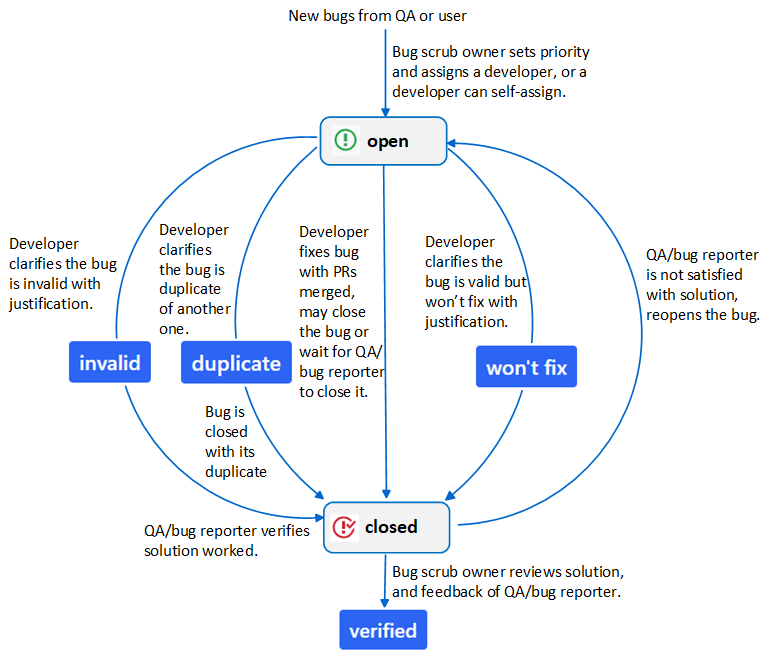
GitHub issues only have two states: open, closed. Dedicated labels are defined to assist SOF bug tracking and triage.
Life Cycle of a Bug#
The life cycle of a bug represents the end-to-end resolution workflow:
Issue Labels#
Please find all labels at thesofproject/sof.
Solution, priority and platform labels are common across SOF firmware, Linux kernel driver, and tool repositories.
Branch labels are repository-specific.
Solution Labels#
Usually a developer will fix a bug by submitting pull requests. This is the default solution and doesn’t require an extra solution label.
Otherwise, developers add the label  ,
,
 , or
, or  to indicate the solution with
justification:
to indicate the solution with
justification:
The label  is added exclusively by the bug scrub owner after
reviewing the solution and confirmation from QA and the reporter:
is added exclusively by the bug scrub owner after
reviewing the solution and confirmation from QA and the reporter:
Priority Labels#
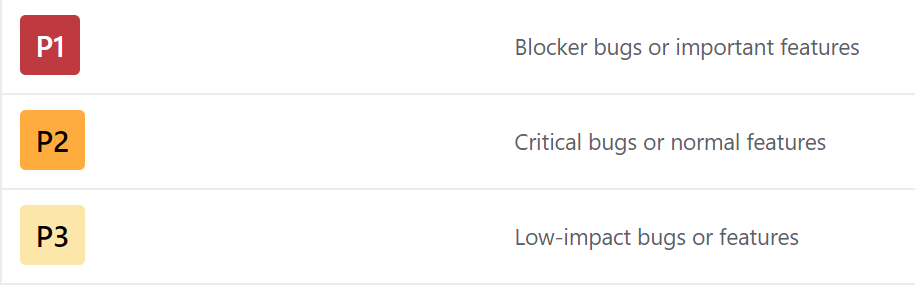
The bug scrub owner assigns priority to a bug according to its impact:
Platform and Branch Labels#
Used by QA and the bug reporter.
Platform labels specify the platform or multiple platforms on
which a bug is observed, e.g.  ,
,  ,
,  …
…
Branch labels specify the branch or branches on which a bug is observed,
e.g.  ,
,  …
…
Note
Platform labels should always be applied.
Branch labels are usually only applied when the branch is not the default branch for developing/release on the platform.
QA should update (add/remove) platform and branch labels according to the latest bug status.
Dependency Labels#
Two optional labels can be used to call for attention:
 - Blocked by an external dependency (feature implementation or bug reproduction).
 - Further information is requested from the reporter.
How to Report a Bug#
Please create an issue
and apply the label .
Please provide the following information:
Title: * Clear, unique, and descriptive summary of the bug. Avoid generic titles like “ipc timeout” or “topology failed to load”. * Include keywords from the kernel, firmware, or user space error message. * Prefix indicating the area of failure, e.g.
ipc:,topology:,pipeline:.Environment: * Branch name and commit hash of three repositories:
sof(firmware),linux(kernel driver), andsof-tools(tools & topology). * Exact topology file name (e.g.sof-tgl-nocodec.tplg). * Target platform(s) on which the bug is observed. * Reproducibility Rate (e.g. 5/5, or 2/10 intermittent).Steps to Reproduce: * Precise, numbered steps from beginning to end so developers can reproduce the exact scenario.
Expected Result: * What the user expected to happen.
Actual Result: * What actually occurred in contrast to expected behavior.
Proof & Diagnostic Logs: * Paste relevant
dmesgand firmware trace logs into the comment box (including 10 lines before the crash/error). * For firmware boot failures, include the trace point indicating boot progress: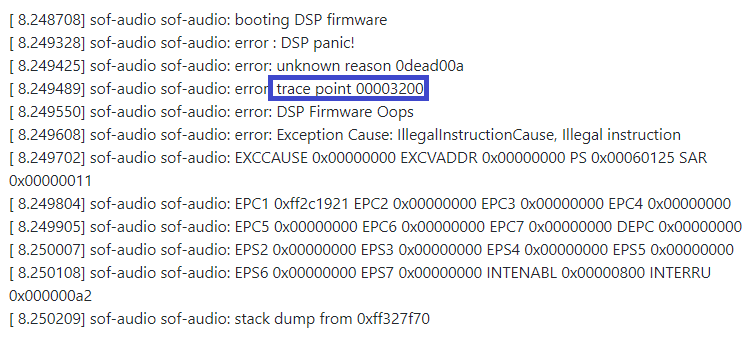
Attach full kernel message buffers and firmware trace output.
If audio playback/capture is silent, attach current
amixersettings.For audio quality anomalies (noise, glitch sound, distortion): * Play/capture a reference sine wave and attach the captured WAV file. * Specify frequency, sample rate, bit format, and channel count. * Provide Audacity waveform screenshots showing the glitch/distortion (> 10ms):

Sine wave with audio glitch:
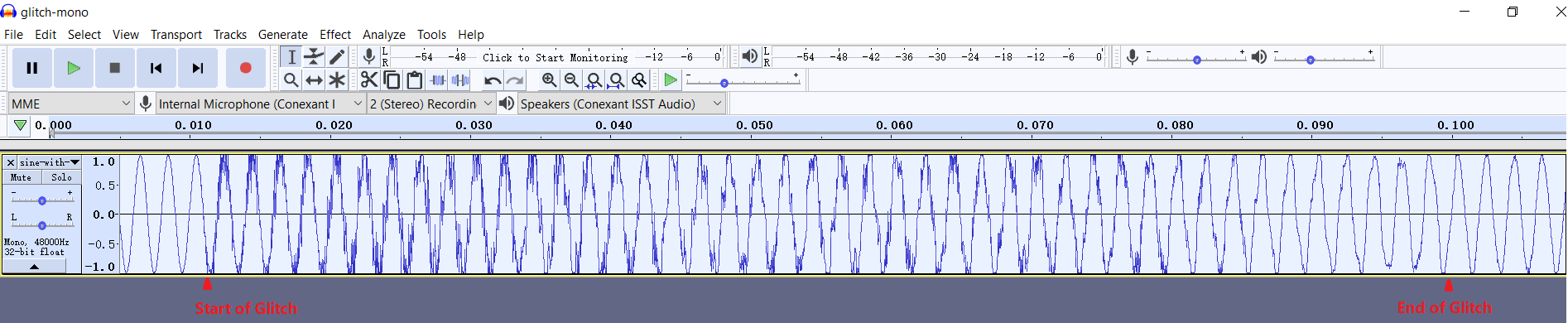
Zoomed in at glitch start:

Zoomed in at glitch end:

Note
If you encounter multiple separate issues, please file them separately so they can be tracked and resolved independently.
Please use GitHub markdown code fences (`) for formatting logs, diffs, and terminal commands.
How to Close a Bug#
Bugs fixed by pull requests: Developers can use GitHub keywords (e.g.
Fixes #1234) in commit messages to automatically close bugs when merged. Developers can also leave the bug open for QA verification; QA closes the issue once verified.Invalid or Won’t Fix: For bugs labeled
or , developers should close them with an explanation.Duplicates: For bugs with label
, keep the issue open until the primary duplicate issue is resolved and closed.
Note
After a pull request is merged, the developer should always mention (@) the bug reporter and QA engineer to verify the resolution.
Documentation Guidelines#
The SOF project documentation is authored using reStructuredText (.rst)
with Sphinx extensions, producing the static HTML website hosted at
https://thesofproject.github.io.
Developers can inspect .rst source files directly or generate the HTML
output locally using make html.
Headings#
Document sections are identified by an underline beneath the title text. For consistency across the SOF project documentation, use the following underline characters:
Use
#for Document Title (top level)Use
*for First sub-section heading levelUse
=for Second sub-section heading levelUse
-for Third sub-section heading level
The heading underline must be at least as long as the title text.
Content Highlighting#
Common reST inline markup:
Single asterisk:
*text*for emphasis (italics)Double asterisks:
**text**for strong emphasis (boldface)Double backticks:
``text``forinline codeand literals
If asterisks or backquotes appear in running prose and could be confused with
inline markup delimiters, prefix them with a backslash (\).
Lists#
For bullet lists, place an asterisk (*) or hyphen (-) at
the start of a paragraph and indent continuation lines by two spaces.
Always insert a blank line before the first list item.
For numbered lists, start with 1. and continue with autonumbering using #.:
1. First ordered step
#. Second ordered step
#. Third ordered step
Definition lists provide a clean term-and-description presentation:
make html
   Generates Sphinx HTML documentation output.

make clean
   Cleans generated documentation build artifacts.
Multi-Column Lists#
For long bullet lists with short entries, render them in columns with .. hlist:::
.. hlist::
   :columns: 3

   * Item A
   * Item B
   * Item C
   * Item D
   * Item E
   * Item F
File Names and Commands#
Sphinx provides semantic inline roles:
Files:
:file:`filename.c`Commands:
:command:`make`Double backticks (
``code``) can also be used for code symbols and paths.
Internal Cross-Reference Linking#
To create cross-page hyperlinks across the documentation site, define an anchor label immediately above a section heading:
.. _my_unique_target:

Section Title
=============
Reference the anchor from any file in the documentation using :ref:`my_unique_target`
(renders as the section heading) or :ref:`Custom Link Text <my_unique_target>`.
Non-ASCII Characters#
Special character substitutions are defined in sphinx_build/substitutions.txt:
.. |br| raw:: html .. force a line break in HTML output (blank lines needed here)
<br />
.. |SOF| replace:: Sound Open Firmware
.. |BYT| replace:: Bay Trail
.. |CHT| replace:: Cherry Trail
.. |HSW| replace:: Haswell
.. |BDW| replace:: Broadwell
.. |APL| replace:: Apollo Lake
.. |CNL| replace:: Cannon Lake
.. |ICL| replace:: Ice Lake
.. |JSL| replace:: Jasper Lake
.. |TGL| replace:: Tiger Lake
.. |TSC| replace:: Technical Steering Committee
.. These are replacement strings for non-ASCII characters used within the project
using the same name as the html entity names (e.g., ©) for that character
.. |copy| unicode:: U+000A9 .. COPYRIGHT SIGN
:ltrim:
.. |trade| unicode:: U+02122 .. TRADEMARK SIGN
:ltrim:
.. |reg| unicode:: U+000AE .. REGISTERED TRADEMARK SIGN
:ltrim:
.. |deg| unicode:: U+000B0 .. DEGREE SIGN
:ltrim:
.. |plusminus| unicode:: U+000B1 .. PLUS-MINUS SIGN
:rtrim:
.. |micro| unicode:: U+000B5 .. MICRO SIGN
:rtrim:
Code and Command Examples#
Use the code-block directive to display syntax-highlighted source code or shell sessions:
.. code-block:: c

   struct sof_ipc_cmd {
       uint32_t size;
       uint32_t cmd;
   };
Supported languages include c, python, bash, console, rst, and none.
Indentation & Formatting#
Indentation is syntactically significant in reST. Use spaces (not tabs). Directives and list continuations must align with the first character of the parent directive name or list text. Keep line lengths under 100 characters for optimal review in GitHub pull requests.
Documenting Source Code (Doxygen)#
All public firmware and driver source code items—including functions, structures, enums, macros, and API declarations in header files—must be documented using Doxygen (dox) annotations.
Basic Rules#
All Doxygen comments begin with
/**and end with*/.Short comments appended to structure members begin with
/**<. Keep them concise.For multi-line documentation, start with a
\briefsummary followed by a blank line and the detailed description.Function parameters are documented with
\param[in],\param[out], or\param[in,out], followed by\return.
Examples#
/**
 * \brief Allocates and initializes an audio stream buffer.
 * \param[in,out] dev Pointer to the SOF core device structure.
 * \param[in] size Requested buffer capacity in bytes.
 * \param[in] flags Memory allocation flags (e.g. SOF_MEM_ZONE_SYS).
 * \return Pointer to allocated sof_buffer, or NULL on allocation failure.
 */
struct sof_buffer *sof_buffer_alloc(struct sof_dev *dev, size_t size, uint32_t flags);
/**
 * \brief Header for non-IPC ABI component data structures.
 */
struct sof_abi_hdr {
    uint32_t magic;     /**< 'S', 'O', 'F', '\0' */
    uint32_t type;      /**< Component specific type */
    uint32_t size;      /**< Size in bytes of payload */
    uint32_t abi;       /**< SOF ABI version */
    uint32_t comp_abi;  /**< Component specific ABI version */
    char data[0];
} __attribute__((packed));
/** \brief Current SOF ABI Major Version */
#define SOF_ABI_VERSION 1
Building & Publishing Documentation#
These instructions explain how to build, preview, and publish the SOF documentation website locally or via Docker.
Documentation Overview#
The SOF project documentation sources reside in the sof-docs repository. Documentation is built using Sphinx with the PyData Sphinx theme, the Breathe extension (integrating Doxygen XML generated from the sof firmware repository), and custom data-generation scripts.
Setting Up Working Repositories#
The recommended directory structure stages sof and sof-docs side-by-side:
mkdir -p ~/thesofproject && cd ~/thesofproject
git clone https://github.com/thesofproject/sof-docs.git
git clone https://github.com/thesofproject/sof.git
cd sof-docs
git remote add upstream https://github.com/thesofproject/sof-docs.git
Installing Documentation Tools#
Install system prerequisites for your operating system:
Ubuntu / Debian:
sudo apt-get install doxygen python3-pip python3-venv make \
   graphviz cmake ninja-build default-jre
Fedora / RHEL:
sudo dnf install doxygen python3-pip make graphviz cmake ninja-build java
Create and activate a dedicated Python virtual environment:
cd ~/thesofproject/sof-docs
python3 -m venv .venv
source .venv/bin/activate
pip install -r scripts/requirements.txt -c scripts/constraints.txt
Running Documentation Processors#
Local Build#
To generate the complete HTML documentation:
cd ~/thesofproject/sof-docs
source .venv/bin/activate
make clean html
The generated static website is located at _build/html/index.html. Open it in any browser:
python3 -m http.server 8085 -d _build/html
Docker Build#
As an alternative to installing dependencies directly on your workstation, use the Docker builder:
cd ~/thesofproject
./sof-docs/scripts/docker_build/docker-build.sh
Publishing Content#
If you have publishing rights to thesofproject.github.io, you can update the public website:
cd ~/thesofproject
git clone git@github.com:thesofproject/thesofproject.github.io.git
cd ~/thesofproject/sof-docs
make publish
Troubleshooting#
Missing Virtual Environment / Dependencies: Ensure your virtual environment is active (
source .venv/bin/activate) and all packages fromscripts/requirements.txtare installed.Doxygen API XML Missing: When building without a local
sofcheckout, runmake html LAX=1to compile documentation using lax mode.PlantUML Version Incompatibility: Verify the PlantUML compiler version with:
java -jar ./scripts/plantuml.jar -version